What you can use — and what the library derives from it (e.g., dew point, SQM equivalent, cloud detection).
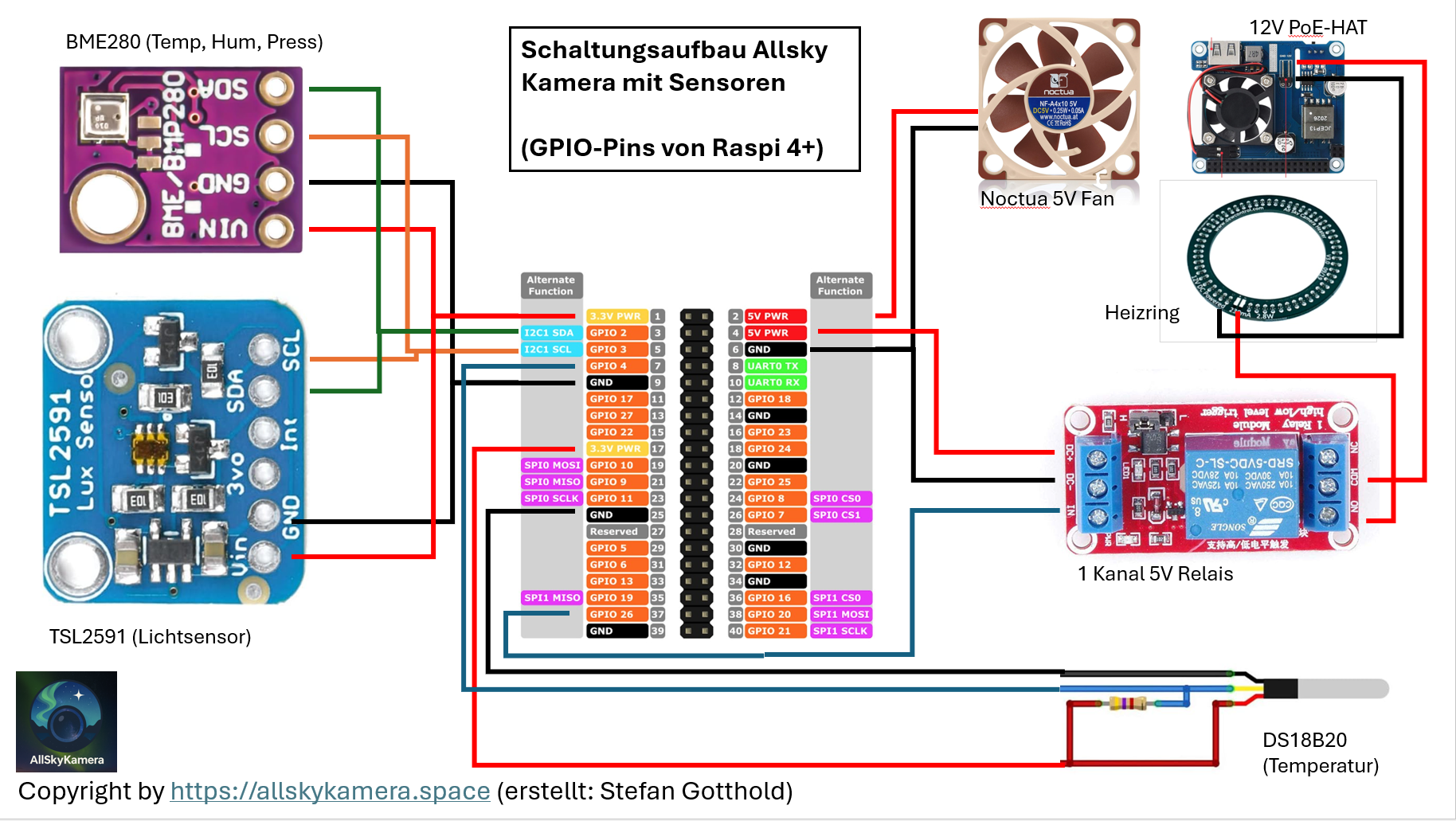
🔌 Wiring (diagram & tips)
Most sensors use I2C or 1-Wire. Clean cable routing and stable power are key for reliable measurements.
Practical
Open image in full size
Basic rules
Keep I2C short, preferably twisted, and away from 12V/heater wiring.
Use a proper pull-up for 1-Wire (DS18B20), e.g. 4.7 kΩ.
Place outdoor sensors to minimize rain and radiation errors.
Route switching lines (relay/heater) separately from sensor cables.
Tip: Build a prototype outside the housing first and test each sensor individually — it saves a lot of debugging later.
🧠 Sensors supported by the library
These sensors are used in the AllSkyKamera network and are supported natively by the library.
Native support
🌡️ BME280 (internal sensor)
Recommended
Measures temperature, humidity and pressure inside the housing. Great for understanding internal conditions and condensation risk.
Additionally computed: dew point.
Tip: Don’t place it directly in the fan airflow — otherwise you measure “fan air” rather than the housing climate.
🧊 DS18B20 (external sensor)
Recommended
Measures the outside temperature near the camera. Useful for inside/outside comparisons and interpreting dew/cloud behaviour.
Tip: Protect it from direct sunlight (radiation error).
☁️ MLX90614 (external / IR temperature)
Optional
Measures IR sky temperature and is a key input for cloud detection.
Tip: Ensure a clear view upwards — avoid aiming at the dome rim or the housing.
🌌 TSL2591 (external / light measurement)
Recommended
Measures brightness and can be evaluated as an SQM equivalent (sky brightness).
Tip: A lens/baffle helps reduce stray light and protects the sensor from rain.
More sensors (also supported natively)
You can also use these humidity/temperature sensors directly: DHT11 / DHT22, HTU21, SHT3x.
🌐
External weather station & additional data (API)
Network only
If you want to integrate additional values such as wind speed or wind direction, use the AllSkyKamera API. The API is intended for camera owners within the network.
Important: The API also requires a secret key. It is available to cameras within the AllSkyKamera network only.